-
Thread상태-22.03.30고급자바 2022. 3. 30. 16:26728x90

생성
실행대기: 실행될 준비됨
실행: 실제 실행해주는것은 프로세서인 CPU이다.
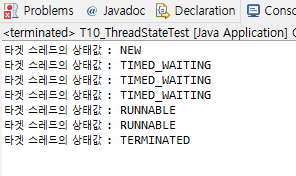
<스레드 상태>
- NEW : 스레드가 생성되고 아직 start()가 호출되지 않은 상태
- RUNNABLE : 실행 중 또는 실행 가능한 상태
- BLOCKED : 동기화블럭에 의해서 일시정지된 상태(LOCK 이 풀릴때까지 기다리는 상태)
- WAITING, TIMED_WAITING : 스레드의 작업이 종료되지는 않았지만 실행가능하지는 않은
일시정지상태(TIMED_WAITING은 일시정지시간이 지정된 경우임.)
- TERMINATED : 스레드의 작업이 종료된 상태public class T10_ThreadStateTest { public static void main(String[] args) { Thread th = new StatePrintThread(new TargetThread()); th.start(); //이렇게 하면 Runnable상태로 바뀜 } }스레드의 상태를 출력하는 클래스
class StatePrintThread extends Thread {
	private Thread targetThread; // 모니터링 할 스레드 저장용

	public StatePrintThread(Thread targetThread) {
		this.targetThread = targetThread; //얘 모니터링좀 해줘 하고 넣어줌
	}

	@Override
	public void run() {
		while(true) {
			// Thread의 상태 구하기 (getState() 이용)
			Thread.State state = targetThread.getState(); //Thread.State 스레드클래스에 있는 State ,스레드안에있는 State타입 enum이 변수에 들어감
			System.out.println("타겟 스레드의 상태값 : " + state.name());

			// NEW 상태인지 검사
			if(state == Thread.State.NEW) {
				targetThread.start(); //main이 스타트하는것이 아니라 다른 스레드가 스타트하고 있음. =>Runnable로 바뀜
			}

			// 타겟 스레드가 종료 상태인지 검사
			if(state == Thread.State.TERMINATED) {
				break;
			}

			try {
				Thread.sleep(500); //0.5초마다 상태변화를 일으킴
			}catch(InterruptedException ex) {
				ex.printStackTrace();
			}
		}
	}
}
모니터링 대상 스레드 클래스
class TargetThread extends Thread {
	@Override
	public void run() {
		for(long i = 1; i <= 1000000000L; i++) {} // 시간 지연용
		try {
			Thread.sleep(1500);
		}catch(InterruptedException ex) {
			ex.printStackTrace();
		}
		for(long i = 1; i <= 1000000000L; i++) {} // 시간 지연용
	}
}
3개(명)의 스레드가 각각 알파벳 대문자를 출력하는데 출력을 끝낸 순서대로 결과를 나타내는 프로그램 작성하기
public class T11_DisplatCharacterTest {
	static String strRank="";

	public static void main(String[] args) {
		Thread[] ths=new Thread[] {
				new DisplayCharacter("홍길동"),
				new DisplayCharacter("일지매"),
				new DisplayCharacter("변학도")
		};
		for(Thread th: ths) {
			th.start();
		}
		for(Thread th: ths) {
			try {
				th.join();
			} catch (InterruptedException e) {
				// TODO Auto-generated catch block
				e.printStackTrace();
			}
		}
		System.out.println("경기 끝...");
		System.out.println("-------------------------------");
		System.out.println();
		System.out.println("경기 결과");
		System.out.println("순위: "+T11_DisplatCharacterTest.strRank);  //T11_DisplatCharacterTest생략가능 나자신의 클래스 접근이므로

	}

}
join을 사용한다면 해당 쓰레드가 종료되기까지 기다렸다가 다음으로 넘어간다.
그래서 경기 끝 이라는 글자부터 하위 출력문들을 쭉쭉 출력할 수 있다.
//영어 대문자를 출력하는 스레드 클래스
class DisplayCharacter extends Thread{
	private String name;

	public DisplayCharacter(String name) {
		this.name = name;
	}

	@Override
	public void run() {
		for(char ch='A'; ch<='Z'; ch++) {
			System.out.println(name+"의 출력 문자: "+ch);

			try {
				//sleep()의 값을 200~500사이의 난수로 한다.
				Thread.sleep((int)(Math.random()*301+200));
			} catch (InterruptedException ex) {
				ex.printStackTrace();
			}
		}
		System.out.println(name + "출력 끝...");
		T11_DisplatCharacterTest.strRank+=name+" ";   //종료되면 이름이 차례대로 들어간다. 메인에서 출력해줄것임.

	}


}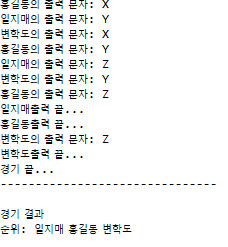
위 데이터는 생략...
728x90'고급자바' 카테고리의 다른 글
ThreadShare-22.03.30 (0) 2022.03.30 Thread yield,Stop,interrupt()-22.03.30 (0) 2022.03.30 ThreadPriority, Daemon Thread-22.03.30 (0) 2022.03.30 단일, 멀티 Thread-22.03.30 (0) 2022.03.30 Thread 처리 시간-22.03.30 (0) 2022.03.30